

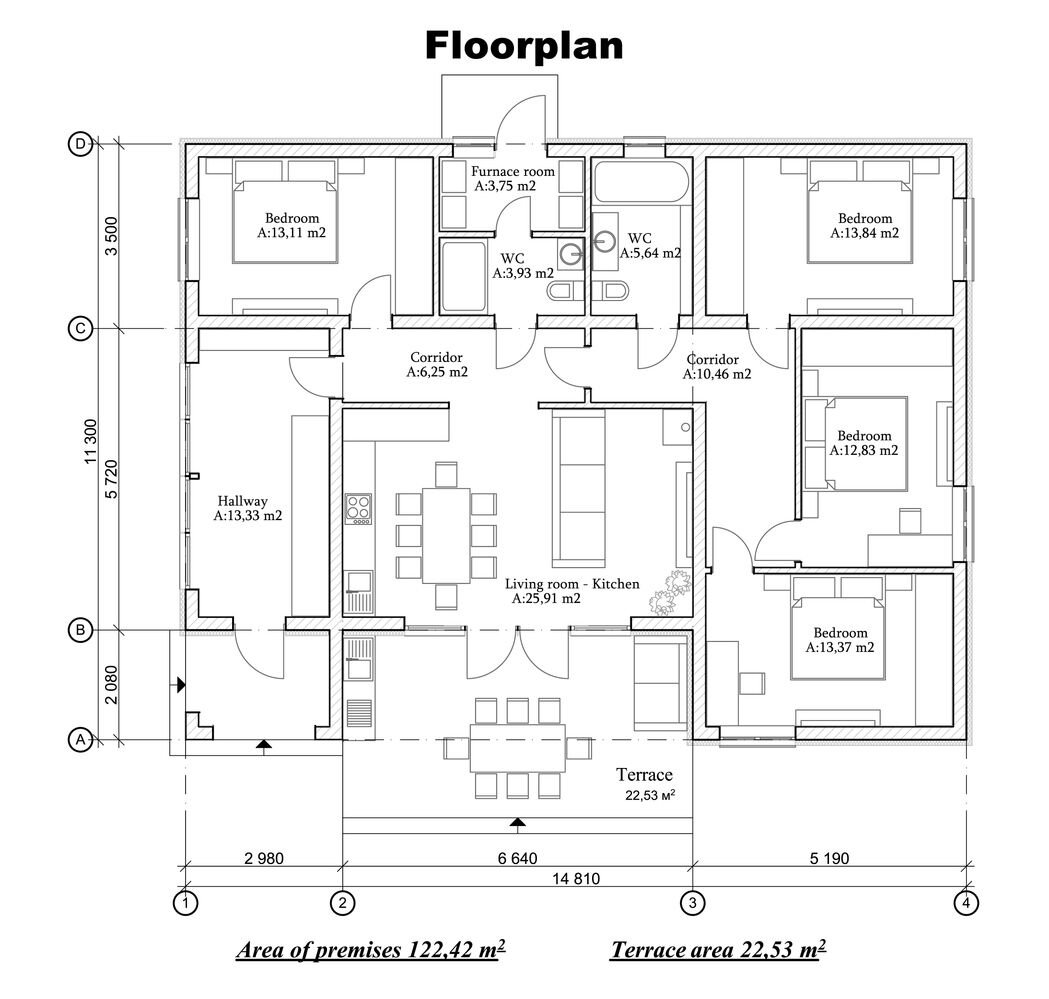
What is a floor plan?
A floor plan is a bird’s-eye view (like looking straight down from above) of your home. It shows how rooms are laid out, where walls are located, and where doors and windows are placed.
— If your home is one story, you’ll have one floor plan.
— For two or more stories, you’ll have one plan for each floor.
Each floor plan shows the same types of information. Let’s break it down.
What you’ll see on a floor plan
— Rooms: Every room in the home is shown, and you can see how they connect.
— Measurements: You’ll see the size (length and width) of each room and the whole house.
— Walls, doors and windows: The plan shows where every wall, doorway and window goes.
—Built-ins: Things like cabinets, bookshelves or entertainment centers are often marked too, though detailed drawings of these will be on other pages.
These are the basics. Now let’s go a little deeper.
How to read dimensions
Dimensions are the numbers that indicate the length or width of something. Here’s how to spot and read them:
— They’re shown on straight lines with marks at the ends.
— Outside the outline of your house, you’ll usually see three lines of measurements:
1. Outer line: The total length or width of the house.
2. Middle line: Distance between major interior walls.
3. Inner line: Distance to things like doors or windows.
Rosie tip: Make sure the smaller measurements on the inside lines all add up to the big number on the outer line. If it doesn’t add up, something may be wrong, and that can cause problems during construction.
Inside measurements
— Interior walls and spaces are measured in a similar way.
— These measurements help the builders know exactly where to put walls, doorways and built-in features like cabinets or shelves.
— Interior openings (like doors between rooms) are usually only measured once. If it’s already shown outside, it may not be repeated inside.
Rooms, doors and windows
Your floor plan will also label every room, door, and window.
Rooms
— Each room has a name, like “kitchen” or “bedroom.”
— Some rooms also have a number, like BATHROOM 103.
— That name and number match up with the Room Finish Schedule, which tells you what materials are used in that room (see more about schedules below).
Doors
— Each door has a number inside a small square or circle.
— That number connects to a Door Schedule (a list with more details about each door).
Windows
— Each window also has a number, usually shown in a hexagon (six-sided shape).
— These numbers match up with a Window Schedule.
What are “Schedules”?
Schedules are just charts (like a table or spreadsheet) that give more information about the rooms, doors and windows in your home.
Room finish schedule
Tells you what finishes go where — for example:
— Floor: Is it carpet, tile or wood?
— Ceiling: What kind of material or texture will be used?
— Walls: What do the walls look like on each side? (They’re labeled North, South, East and West.)
Sometimes schedules use codes that match other drawings to give more detail.
Door schedule
Offers details for every door in the house:
— Door number
— Size (width and height)
— Type (painted, stained wood, etc.)
— Handing: Which way the door swings (left or right hand, in or out)
— Hardware (example, entry lock vs. bathroom lock)
— Notes from the designer about anything special
Window schedule
Usually simpler:
— Window number
— Size
— Sometimes manufacturer or special info, i.e., Rough Opening, “RO”
Elevations, sections and details
The floor plan also tells you where to look for extra views from the blueprint set:
— Elevations: These views show the outside (or sometimes inside) walls from the side. They’re marked with a triangle symbol and a letter, like Elevation A.
— Sections: This view is like slicing the house in half to show what’s inside. Look for bold lines with arrows and labels.
— Details: Zoom views blow up small areas to show how something is built, like a corner of a shower or a stair step.
Using 3D software
If you’re not used to looking at 2D drawings, it can be hard to picture what your house will really look like.
Good news: 3D software can turn your floor plan into a virtual model that you can walk through. You’ll be able to see the space and how it flows before construction even starts. There are free websites available where AI allows you to import your plans.
Final Rosie tip
Get several complete sets of your house drawings — and keep them safe.
Treat them like family heirlooms. You’ll likely need them for future repairs, remodels or permits.
The top stories from Sunday's Home+Life section in the Arizona Daily Star.